BUSINESS IDEAS
How to Boost Consumer Conversion, Acquisition, and Retention
Turning potential customers into loyal buyers takes more than a great product or an effective...
Learn More

 June 3, 2024
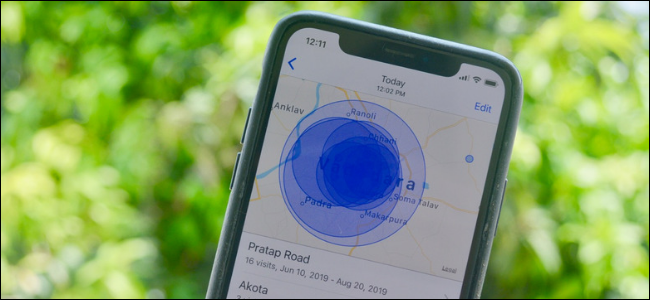
If you have Location Services switched on, your iPhone keeps track of where you go by default. Although Apple claims that this history is encrypted end-to-end, you do not want it built in the first place. It’s simple to switch off iPhone’s location history, but it’s hidden behind layers of menus. Here’s how to do it.
1. Go to Settings on your iPhone.
2. Tap Privacy
3. In privacy, select location Services
4. In Location Services, you need to scroll down and choose System Services
5. From here choose “Significant locations”
6. In “Significant Locations,” tap the switch beside “Significant Locations” to turn it off.
“Significant Locations” on an iPhone are places you frequent, such as your home or office. By tracking your movements and inferring about your everyday routines, your iPhone learns where those places are. One advantage is that you can tell Siri to “take me home” or set Reminders to remind you of something when you arrive at a Significant Location.
Related
How to Fix iPhone Rotation Issues? Here’s How To Fix It!
How to Fix iPhone Rotation Issues? Here’s How To Fix It!
You’ll see a scary-looking message about disabling Significant Locations when you press the button. But don’t worry, it’s not needed for any of the apps mentioned. Switch off the device by pressing the “Turn Off” button.
Meanwhile, you can scroll down and check your location history data while on the “Significant Locations” screen. Tap “Clear History” to get rid of it.
You’re all set now. Simply exit Settings and your iPhone will stop tracking your every move. It’s starting to feel a lot like the 1990s!
Telecom Lead Management: Follow Up Without Losing Sales
Oct 19, 2026

Franchise Law Basics: What Every Owner Should Know
Oct 16, 2026
How Cox Business Products Help Dealers Drive Growth
Oct 15, 2026

7 Reasons to Become a Vivint Authorized Reseller
Oct 14, 2026

Why Become an Internet Provider Dealer? 7 Key Benefits
Oct 13, 2026


9
Oct, 2026
BUSINESS IDEAS
Turning potential customers into loyal buyers takes more than a great product or an effective...
7
Sep, 2026
HOME SECURITY
Choosing the right home security system is about more than installing a few cameras or...

19
Aug, 2026
HOME SECURITY
Customer lifetime value telecom dealer performance depends on one core metric — CLV — the...