HOME SECURITY
Practical Ways to Market Your Business Online
Marketing your business online is no longer optional—it’s a fundamental part of modern growth. Whether...
Learn More

 June 3, 2024
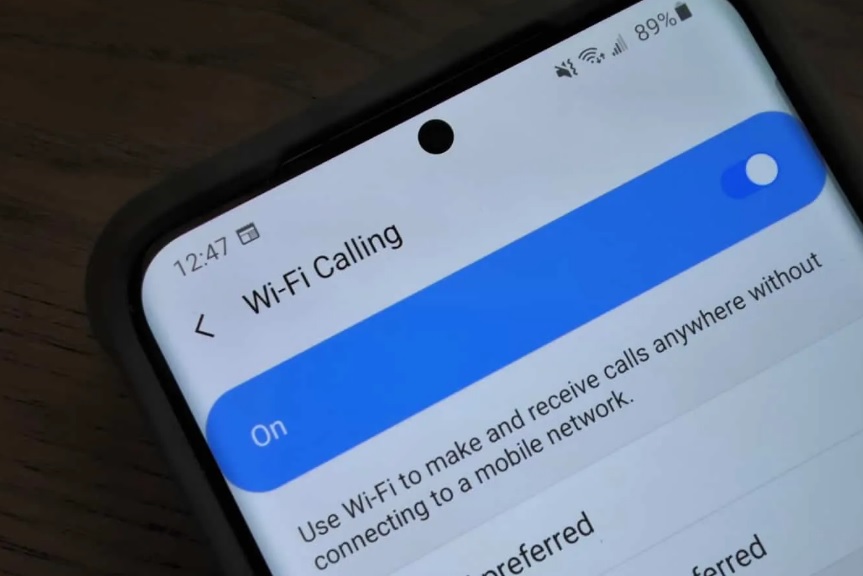
Even if you don’t have a mobile signal, you can make phone calls on your Samsung phone. You can make calls over a Wi-Fi network instead of your phone’s network if you have a Samsung S5 or higher and access to a cellular network. It isn’t allowed by default, but it is simple to allow.
Related: Way on How to Unlocked Your Samsung Phone
Instead of using your phone network, Wi-Fi calling uses your wireless network to make calls. If you have spotty phone coverage in some parts of your home or are visiting somewhere with excellent Wi-Fi but poor phone service, it can be extremely useful.
Wi-Fi connections used to be less secure than they are now, so Wi-Fi calling wasn’t always a viable choice. There aren’t many reasons to stop Wi-Fi calling, but there are a few problems that may occur. For starters, it will use your data plan, which means that if you have a limited data limit on your wireless data usage, Wi-Fi calling will deplete it.
Also, Read: The Best Free Texting And Calling Apps For iOS and Android
You’re still more likely to drop a call if your wireless connection is bad. To be successful, Wi-Fi calling requires a strong signal.
Become a JNA Dealer & Sell Samsung Mobile Products
1. There are a variety of ways to allow Wi-Fi calling. The first is in the settings app on your computer.
2. Make sure you’re connected to the internet through Wi-Fi.
3. Tap Connections after opening your phone’s settings.
4. Now, Touch the switch next to Wi-Fi Calling.
This feature can also be turned on in the Phone app. To turn it on, follow the steps below.
1. Tap the Phone from your phone’s home screen.
2. To access the settings, tap the Menu or More icon.
3. Switch on Wi-Fi Calling.

How to Verify a Telecom Dealer Before You Partner
Mar 27, 2026

How to Run a Successful Franchise Without Guesswork
Mar 20, 2026
Fix WiFi Sign-In Issues on Android (2026 Guide)
Mar 18, 2026

Equipment Loans: Smart Funding or Costly Mistake?
Mar 17, 2026

5G / 6G: What Dealers Must Prepare For
Mar 16, 2026


4
Mar, 2026
HOME SECURITY
Marketing your business online is no longer optional—it’s a fundamental part of modern growth. Whether...

20
Feb, 2026
HOME SECURITY
In an increasingly competitive business environment, companies are under constant pressure to operate more efficiently...
18
Feb, 2026
HOME SECURITY
Business security has moved far beyond traditional alarm systems and basic CCTV cameras. Today’s smart...