HOME SECURITY
Practical Ways to Market Your Business Online
Marketing your business online is no longer optional—it’s a fundamental part of modern growth. Whether...
Learn More

 June 3, 2024
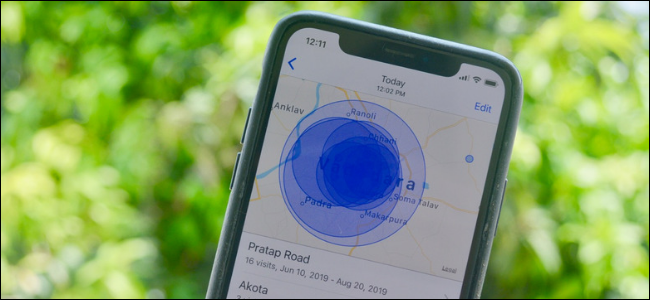
If you have Location Services switched on, your iPhone keeps track of where you go by default. Although Apple claims that this history is encrypted end-to-end, you do not want it built in the first place. It’s simple to switch off iPhone’s location history, but it’s hidden behind layers of menus. Here’s how to do it.
1. Go to Settings on your iPhone.
2. Tap Privacy
3. In privacy, select location Services
4. In Location Services, you need to scroll down and choose System Services
5. From here choose “Significant locations”
6. In “Significant Locations,” tap the switch beside “Significant Locations” to turn it off.
“Significant Locations” on an iPhone are places you frequent, such as your home or office. By tracking your movements and inferring about your everyday routines, your iPhone learns where those places are. One advantage is that you can tell Siri to “take me home” or set Reminders to remind you of something when you arrive at a Significant Location.
Related
How to Fix iPhone Rotation Issues? Here’s How To Fix It!
How to Fix iPhone Rotation Issues? Here’s How To Fix It!
You’ll see a scary-looking message about disabling Significant Locations when you press the button. But don’t worry, it’s not needed for any of the apps mentioned. Switch off the device by pressing the “Turn Off” button.
Meanwhile, you can scroll down and check your location history data while on the “Significant Locations” screen. Tap “Clear History” to get rid of it.
You’re all set now. Simply exit Settings and your iPhone will stop tracking your every move. It’s starting to feel a lot like the 1990s!

How to Verify a Telecom Dealer Before You Partner
Mar 27, 2026

How to Run a Successful Franchise Without Guesswork
Mar 20, 2026
Fix WiFi Sign-In Issues on Android (2026 Guide)
Mar 18, 2026

Equipment Loans: Smart Funding or Costly Mistake?
Mar 17, 2026

5G / 6G: What Dealers Must Prepare For
Mar 16, 2026


4
Mar, 2026
HOME SECURITY
Marketing your business online is no longer optional—it’s a fundamental part of modern growth. Whether...

20
Feb, 2026
HOME SECURITY
In an increasingly competitive business environment, companies are under constant pressure to operate more efficiently...

18
Feb, 2026
HOME SECURITY
Business security has moved far beyond traditional alarm systems and basic CCTV cameras. Today’s smart...