




MOBILITY
Best Offline Apps That Save Data on Prepaid Plans
If you’re using a prepaid mobile plan, you already know how quickly data can disappear....
Learn More


 June 3, 2024
A hacked smartphone is a horrible thing, so you need to address it as soon as possible if you believe your phone has been hacked. How to repair the damage (as much as possible) and get back to normal life is discussed in this post.
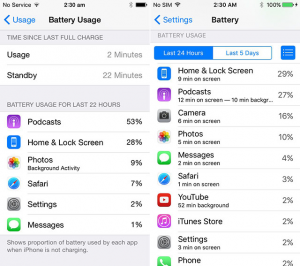
Indications that your phone has been compromised include rapid loss of charge, slow running, unusual behavior like pop-up windows or unexpected applications appearing in your phone logs, or unfamiliar calls or texts.
Also, Read:
Personal Safety Features of Android You Should Recognize and Use
Causes of a hacked smartphone
For a number of reasons, your phone can get hacked, not all of which are completely under your fingertips.
1. On social media sites, click on links that take you to a site that installs malware on your computer.
2. Choosing links that install malicious software in phishing emails.
3. SIM card hacking where the provider is persuaded by the hacker to give them a new SIM card.
4. Hackers connect through a Bluetooth or Wi-Fi connection to your phone.
The findings are usually the same, regardless of how hackers managed to install malware or a virus on your phone. To benefit in any way, the hacker would try to exploit any information found on your phone.
This may involve searching for personal or confidential information, such as bank account numbers, your social security number, or online account passwords, via files on your phone.

Using the steps below, you can clean your phone and get rid of hacking activity. These fixes refer to any Android edition and to any manufacturer of Android phones.
1. Switch on the Android Safe Mode first. Once this is allowed, uninstall your Android from all newly installed or unrecognized applications. Even, make sure to check for secret apps. By opening the Google Play Store app and choosing My apps & games, then sorting Installed apps by Last Downloaded, you can also see apps that have recently been installed on your Android. Uninstalling apps that are unrecognized or newly updated can help delete any possible malicious software that you have installed accidentally.
2. Install a Mobile antivirus application to update your phone. These apps will search your phone for malicious files and apps that compromise the protection of your phone and delete them permanently.
3. If your Android phone has been rooted, you have opened up device areas that are usually covered by security privileges. To reverse this, one of the root apps like SuperSU to unroot your Android and make it safe again.
4. Reset your PIN code and Android lock screen. This will mean that if a hacker has compromised your login details and hacked your phone in that way, once you restart your Android, they won’t be able to get back in. For additional protection, people can also lock applications using screen pinning
Related Articles:

How to Run a Successful Franchise Without Guesswork
Mar 20, 2026
Fix WiFi Sign-In Issues on Android (2026 Guide)
Mar 18, 2026

Equipment Loans: Smart Funding or Costly Mistake?
Mar 17, 2026

5G / 6G: What Dealers Must Prepare For
Mar 16, 2026

Comcast Business vs Residential Internet (2026 Guide)
Mar 13, 2026


13
Feb, 2026
MOBILITY
If you’re using a prepaid mobile plan, you already know how quickly data can disappear....
27
Jan, 2026
WHOLESALE CELL PHONE
Smartphones have become essential, but their price tags keep climbing. Each new release promises incremental...

26
Jan, 2026
BUY PHONES IN BULK
Bulk buying smartphones has become a practical strategy for retailers, resellers, organizations, and teams that...