HOME SECURITY
Practical Ways to Market Your Business Online
Marketing your business online is no longer optional—it’s a fundamental part of modern growth. Whether...
Learn More

 June 3, 2024
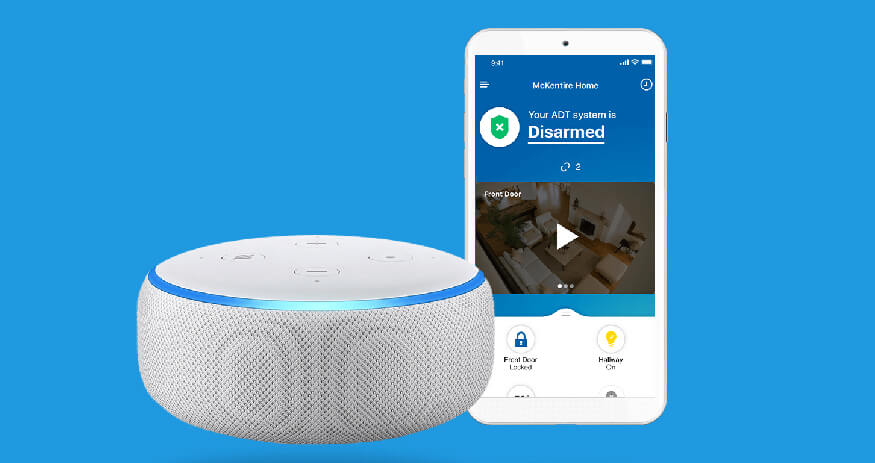
In this article, you will learn how to set up your Alexa and ADT. With the ADT Pulse Skill, you can control your smart security with voice commands. You can ask Alexa to disarm and arm, and capture videos with your home security.
Amazon Alexa is one of the most desired and useful smart home assistants today with many great features including Alexa Guard. Alexa Guard can be integrated with the smartest home security system today such as Brinks and Vivint Alarm. It provides many features and alerts for potential dangers and emergencies.
You can also ask Alexa to turn on or off your lights and ask the current temperature of your house. But before all these features works, and to add more security to your device, you need to provide Alexa with a unique pin code.
Related Article: How to Use Google Assistant to control your Vivint System
Simply say “Alexa, ask ADT…” and add some voice command to control your system. Below are some commends you can use to start using Alexa to work with the security system.
To know the temperature of your Thermostat simply say “Alexa, ask ADT the temperature of my thermostat”
Vacation – “Alexa, ask ADT to set my mode to Vacation”
Security – “Alexa, ask ADT to disarm my system with 4792”
Locks – “Alexa, ask ADT to lock the front door”
Camera – “Alexa, ask ADT to record a clip of my front door camera”
Status – “Alexa, ask ADT to check the status of my system”
Garage Door – “Alexa, ask ADT to close the Garage Door”
Batteries – “Alexa, ask ADT is the front door sensor battery low?”
1. You can also order your favorite pizza with a single command.
2. Ask to play music with TuneIn radio, Pandora, and iHeartRadio.
3. You can also open KIndle to listen to audiobooks.
4. Set an alarm for work and other tasks.
5. Track Amazon Purchases.
6. Ask the latest news on weather, sports, and traffic updates.
1. Install your Echo Dot or Amazon Echo, refer to your user manual that came with your device.
2. Open Alexa and log in to App. If you still don’t have it installed, Head go to PlayStore or AppStore to download Alexa App. Once installed, log in with your Amazon account.
3. The next step is to enable ADT Pulse Skill. To do this, tap the “Skill” option on the left side menu within the mobile app, type and select “ADT Pulse” and tap enable “Enable Skill“.
4. After pressing “Enable Skill“, a window will pop up asking for ADT login and password. Enter your ADT credential to sync.
5. Go to Pulse web portal (portal.adtpulse.com) to review your device name. The device name will use when you give Alexa voice command.

* To know more about ADT home security, click the button below.


Practical Ways to Market Your Business Online
Mar 4, 2026
Dealer Onboarding Checklist for Faster Sales
Mar 3, 2026

Best Places to Sell Used Smartphones for Profit
Mar 2, 2026

Direct vs Dealer Sales: Managing Channel Conflict
Mar 2, 2026
How Telecom Dealers Handle Customer Complaints Right
Feb 26, 2026

4
Mar, 2026
HOME SECURITY
Marketing your business online is no longer optional—it’s a fundamental part of modern growth. Whether...

20
Feb, 2026
HOME SECURITY
In an increasingly competitive business environment, companies are under constant pressure to operate more efficiently...
18
Feb, 2026
HOME SECURITY
Business security has moved far beyond traditional alarm systems and basic CCTV cameras. Today’s smart...